ID Card Professional Canva Template
Creating a professional ID card for your corporate office has never been easier with the ID Card Professional Canva Template. Designed specifically for agencies and companies, this template allows you to create both front and back sides of an ID card with full customization. Whether you're setting up a new office or updating your current staff IDs, this template offers everything you need in one place.
What is the ID Card Professional Canva Template?
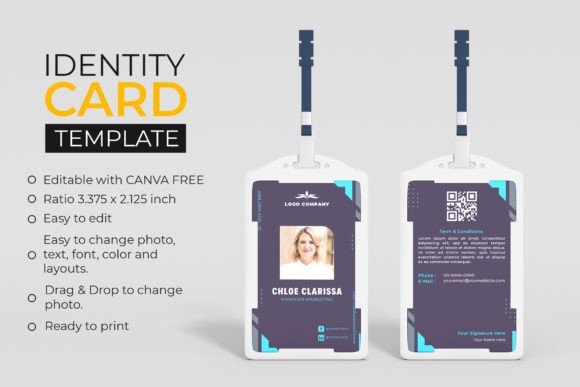
The ID Card Professional Canva Template is a digital design resource that lets you craft high-quality ID cards tailored to your brand's identity. It comes in a standard size of 2.125 x 3.375 inches, making it ideal for printing. The template includes both sides of the ID card, so you can add information like name, title, photo, and company logo on the front, while the back side can feature access levels, QR codes, or other relevant details.
This template is fully customizable, allowing you to change colors, fonts, layouts, and even add your own photos and icons. With Canva’s drag-and-drop interface, you can easily edit elements without needing advanced design skills.
Why Choose This ID Card Template?
If you're looking for a quick, efficient way to produce professional-looking ID cards, this template is a great choice. Here are some key reasons why:
- Easy to edit: No complicated software required. Just open the template in Canva and start customizing.
- Customizable design: Change colors, fonts, and layout to match your brand’s identity.
- Drag-and-drop photo editing: Easily replace the default photo with your employee's image using a simple drag-and-drop feature.
- Ready to print: Once you're satisfied with the design, you can download and print it directly from Canva.
Whether you're managing a small team or a large organization, this template provides a consistent and professional look across all your ID cards.
Who Can Benefit from This Template?
This template is perfect for a wide range of users, including:
- Corporate offices: Create uniform ID cards for employees, visitors, or contractors.
- Agencies: Use it to issue ID cards to clients, partners, or remote workers.
- Small business owners: Make professional ID cards for your staff without hiring a designer.
- Freelancers and entrepreneurs: Ideal for creating business cards or event badges with a professional touch.
With its user-friendly features, even those with no design experience can use this template effectively.
How to Get Started with the ID Card Template
To begin using the ID Card Professional Canva Template, you’ll need a free Canva account and basic knowledge of the platform. Once you’ve downloaded the template, you can:
- Open it in Canva and click on any text box to edit the content.
- Use the color picker to choose colors that match your brand’s palette.
- Replace the default photo with your own by dragging and dropping an image into the designated area.
- Adjust fonts and layouts to suit your preferences.
- Once you’re happy with the design, download it in high resolution and send it to a printer.
You can also remove backgrounds, add icons, or insert QR codes for added functionality. The flexibility of this template ensures that you can tailor each ID card to fit your specific needs.
Important Considerations Before Using the Template
Before downloading and using the ID Card Professional Canva Template, there are a few things to keep in mind:
- No physical items will be shipped: This is a digital download, so make sure you have a stable internet connection and enough storage space.
- Canva knowledge required: While the template is easy to use, having a basic understanding of Canva will help you make the most of its features.
- Free version available: You can use the free version of Canva to edit, personalize, and download the template without any cost.
- Print-ready format: Ensure that your printer supports the 2.125 x 3.375 inch ratio to avoid any issues during printing.
By considering these points, you can ensure a smooth and successful experience when creating your ID cards.
Real-World Use Cases
Here are a few examples of how the ID Card Professional Canva Template can be used in real-life scenarios:
- Office Staff IDs: Create personalized ID cards for employees with their names, titles, and department information.
- Event Badges: Use the template to make event badges for conferences, trade shows, or internal meetings.
- Visitor Passes: Design temporary visitor passes with time limits and access permissions.
- Agency Client Cards: Issue client cards to partners or collaborators with contact details and company logos.
These use cases highlight the versatility of the template and how it can be adapted to different situations and industries.
Final Thoughts
The ID Card Professional Canva Template is a powerful tool for anyone looking to create professional, customized ID cards quickly and efficiently. Its ease of use, flexibility, and print-ready format make it an excellent choice for businesses of all sizes. Whether you're a first-time user or an experienced designer, this template provides everything you need to create stunning ID cards that reflect your brand's identity.